USCIS Case Status Online: my.uscis.gov, Receipt Lookup, and Email/Text Notifications
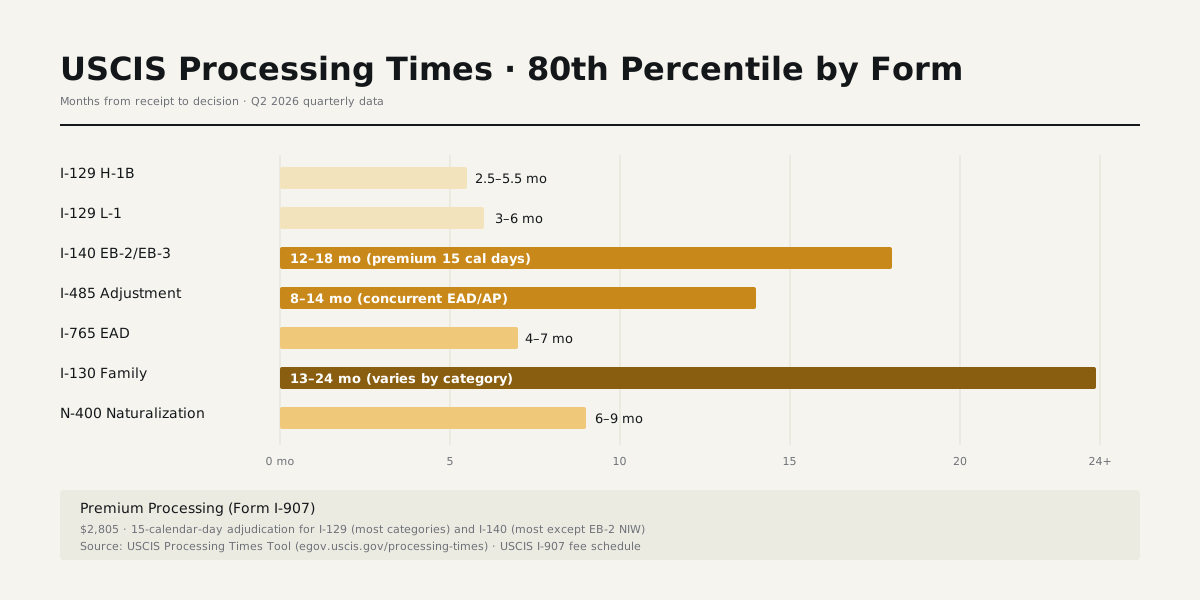
USCIS processing times in 2026: I-129 H-1B 2.5–5.5 months standard; I-140 EB-2 8–14 months; I-485 employment 10–18 months; N-400 5–10 months. Premium processing windows separate (15 calendar days for I-129 / I-140).
The Two USCIS Online Tools
USCIS provides two separate online status tools, each with different capabilities:
- egov.uscis.gov/casestatus — receipt-number lookup, no account required, returns current status
- my.uscis.gov — account-based portal with email/text notifications, document upload, and case linking
Most applicants benefit from registering with my.uscis.gov for the proactive notifications.
Setting Up a my.uscis.gov Account
Account creation requires email verification and identity verification. Once registered, link cases to the account using receipt numbers. Each linked case generates email / text notifications when USCIS updates status.
Multiple cases can be linked to one account — useful for primary beneficiaries with derivative dependents. Family members with separate filings can link to a shared account or separate accounts.
Notification Triggers
my.uscis.gov sends notifications on these triggers: receipt issuance, biometrics appointment scheduled, RFE issued, case transferred to different service center, decision posted, document mailed.
Notifications typically arrive within 24–48 hours of internal USCIS action. Email is the default channel; text (SMS) is opt-in.
What the Online Tools Don't Show
Online tools don't show: officer notes, internal review status, why a case is in extended processing, or detailed RFE content (RFEs are mailed in paper form). For this information, applicants must contact USCIS via the customer service line (800-375-5283) or InfoPass appointment.
Outside-Normal-Time inquiries unlock once the case exceeds the 80th-percentile upper bound for the form / classification / service center — accessed via the case-status portal.
Common Troubleshooting
Receipt number not found: typo (most common — check the L vs 1, O vs 0), case too new (24-hour delay before search availability), or transfer in progress between service centers. Try again in 24 hours.
Status hasn't changed in months: typical for cases in normal processing — most cases sit in "Received" status for the bulk of the processing window. Status updates only at milestone events.
Cross-Pillar Reading
- USCIS Case Status Check · receipt-number lookup detail
- USCIS Receipt Number · format decoder
- USCIS Processing Times · 80th-percentile windows
Bottom line
USCIS processing times are population-level 80th-percentile windows, refreshed monthly. Match your form, classification, and service center precisely; ignore generic 'average' estimates that don't break out by service center.
Frequently asked questions
- How do I check USCIS case status and track your case online?
- To check USCIS case status, enter your 13-character receipt number at egov.uscis.gov/casestatus — no account needed. To track your case with proactive alerts, create a my.uscis.gov account and link the receipt number; the USCIS tracking portal then pushes email or text notifications at every milestone (receipt, biometrics, RFE, decision). Both tools read the same underlying record, so the status shown is identical.
- How do I read my receipt number?
- USCIS receipt numbers are 13 characters: a 3-letter service-center prefix (VAC, EAC, IOE, MSC, etc.) + 2-digit fiscal year + 3-digit Julian day code + 5-digit serial. The prefix tells you which service center handled the initial intake.
- What is biometrics and when is it scheduled?
- USCIS uses biometrics for FBI background checks, photograph, and signature. Most I-485, I-765, I-131, N-400 cases require it. Biometrics reuse from prior cases can be applied to skip the appointment in some categories.
- What does the USCIS processing-time range mean?
- USCIS publishes the 80th-percentile completion window: 80% of cases complete within the upper bound. The lower bound is the 50th-percentile (median) completion time; together they define the dashboard range.
- How often does USCIS update processing times?
- USCIS refreshes the processing-times dashboard monthly, around the 15th of each month. Numbers reflect the prior month's adjudication completions, so the dashboard always lags real-time by 30-60 days.
- What's the difference between case status and processing times?
- Two different tools: case status reports state changes for your specific receipt; processing times show statistical adjudication windows. They share the egov.uscis.gov domain but answer different questions.