USCIS Case Status: Receipt Numbers, Status Codes, and Outside-Normal-Time Inquiries
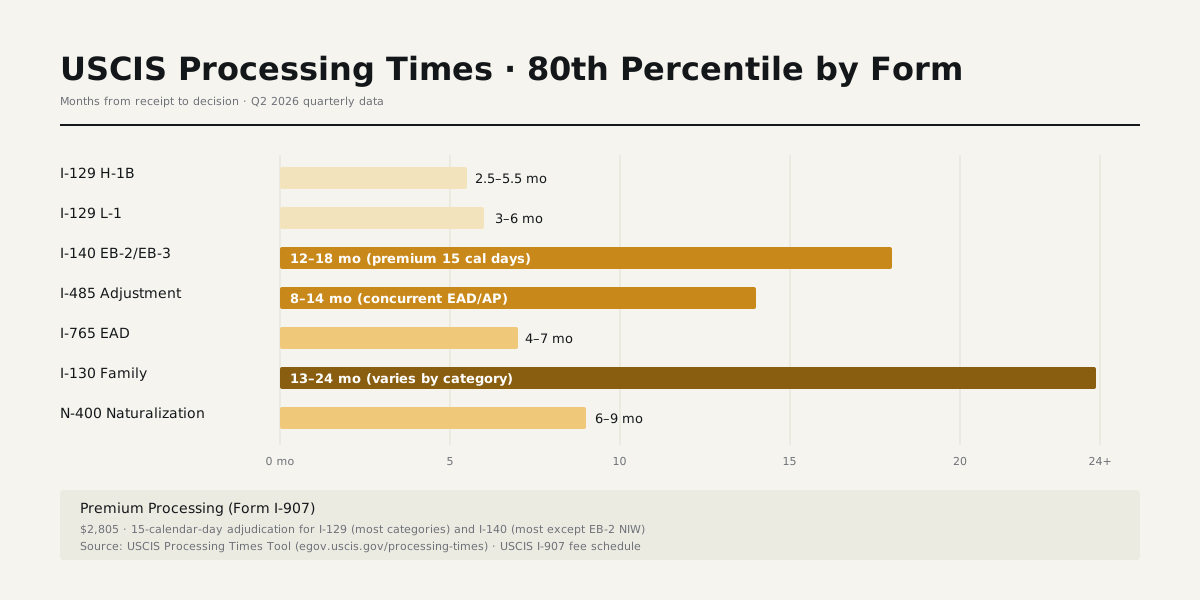
USCIS processing times in 2026: I-129 H-1B 2.5–5.5 months standard; I-140 EB-2 8–14 months; I-485 employment 10–18 months; N-400 5–10 months. Premium processing windows separate (15 calendar days for I-129 / I-140).
How to Check USCIS Case Status
USCIS provides two channels for case status: egov.uscis.gov/casestatus for receipt-number lookup, and my.uscis.gov for account-based notifications. Both use the same data source — your filing's current status in USCIS systems.
Account-based my.uscis.gov adds email and text notifications when status changes. Receipt-only checking returns the current status without notifications.
Reading the Receipt Number
USCIS receipt numbers are 13 characters: a 3-letter service-center prefix + 2-digit fiscal year + 3-digit Julian day code + 5-digit serial. Common prefixes:
- LIN — Lincoln (Nebraska Service Center)
- EAC — Vermont Service Center
- SRC — Texas Service Center
- WAC — California Service Center
- MSC — National Benefits Center
- IOE — ELIS electronic filing
Common Status Codes
Typical I-129 / I-140 / I-485 / I-765 case progression:
- Case Was Received — initial receipt acknowledged
- Fingerprint Fee Was Received / Biometrics Scheduled — biometrics phase
- Request for Initial Evidence Was Sent — RFE issued, response required
- Case Was Approved — adjudication complete with approval
- Notice Was Sent — physical mailing of decision
- Card Was Mailed — for EAD / green card
Outside-Normal-Time Inquiry
Once the case exceeds the 80th-percentile upper bound for the form / classification / service center, the case becomes eligible for an outside-normal-time inquiry. Filed via egov.uscis.gov tools or by calling 800-375-5283.
Inquiries don't accelerate adjudication directly but can flag stuck cases. If the inquiry response is unsatisfactory, the next step is congressional inquiry through your House Representative or Senator's office.
Status vs Processing Times Distinction
Case status (egov.uscis.gov/casestatus) shows your specific case's current status. Processing times (egov.uscis.gov/processing-times) show population-level completion windows by form / classification / service center. Use case status for your specific filing; use processing times to gauge how close you are to typical completion.
The two tools share the same domain but answer different questions. Both lag real-time slightly — case status updates can take 24–48 hours after USCIS internal action.
Cross-Pillar Reading
- USCIS Processing Times · 80th-percentile windows
- Case Status Online · my.uscis.gov account features
- USCIS Receipt Number · format decoder
Bottom line
Verdict: read processing times by exact form-classification-service-center combination, not blended averages. The dashboard's 80th-percentile upper bound also gates case-inquiry eligibility — useful for stuck cases.
Frequently asked questions
- What is biometrics and when is it scheduled?
- USCIS uses biometrics for FBI background checks, photograph, and signature. Most I-485, I-765, I-131, N-400 cases require it. Biometrics reuse from prior cases can be applied to skip the appointment in some categories.
- What does the USCIS processing-time range mean?
- The published range is the time that 50% of cases (lower bound) and 80% of cases (upper bound) take to complete. 'Outside normal processing time' is set at the same upper-bound value — it's the threshold for filing a case inquiry.
- How often does USCIS update processing times?
- Monthly refresh, around the 15th. Each update reflects completions from the prior month, so the displayed numbers are a rolling snapshot rather than a real-time view.
- What's the difference between case status and processing times?
- Case status is per-receipt-number; processing times are population-level. Use case status to track your specific filing; use processing times to gauge how close you are to the typical completion window for that form/classification.
- When can I file a case inquiry on USCIS?
- The case-inquiry threshold equals the upper bound of the processing range. Once your receipt date plus that interval is in the past, the inquiry tool unlocks. Inquiries don't accelerate adjudication directly but can flag stuck cases.